Fantinel.dev v5 is here!
10 min read
Out with the green waves, in with the rainbow of pastel colors!

Adding an automatic ellipsis to some text if it overflows its content is simple enough. You just set overflow: hidden to make sure the container doesn't scroll, and then text-overflow: ellipsis to add the ellipsis to the edge of the text.
.example {
	text-overflow: ellipsis;
	overflow: hidden;
}
But what if you want your text to have multiple lines, but still cut off if it's too big? For example, you want to show the excerpt of a blog post on a blog post card (just like the ones on this blog). You want it to go up to 4 lines, but if the excerpt is bigger than that, you want to add the ellipsis at the end of the 4th line.
Turns out there's a neat little trick, using some -webkit prefixed properties. Don't worry, it works on all modern browsers, including Firefox and Safari.
.example {
	text-overflow: ellipsis;
	overflow: hidden;
	display: -webkit-box;
	/* Set this to the max number of lines you want */
	-webkit-line-clamp: 4;
	-webkit-box-orient: vertical;
}
Here's how it looks like:
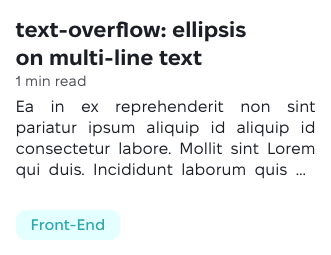
Taken from this StackOverflow answer.
Fantinel.dev v5 is here!
10 min read
Out with the green waves, in with the rainbow of pastel colors!
Setting up Storybook on an Astro project
7 min read
I really, really thought this was gonna be easy.
CSS “Quantity Queries” are a thing now
4 min read
With the :has selector available everywhere now, there's a neat way of styling elements depending on how many elements are inside them.
Automating Social Media Preview Images
6 min read
Social media preview images are very useful if you want to attract people to your website. They're sometimes a pain to create, though. Let's automate it!